

Chamet Agency Dashboard Guide
Managing Your Agency System
The Chamet Agency Dashboard is the main management panel used by agents to recruit hostesses, manage sub-agents, monitor earnings, and track commission performance.
How to Access the Chamet Agent Dashboard ?
After completing your Chamet agency registration, you can log in to the management system using your registered credentials.
Step-by-step access:
Open the official Chamet login portal
Enter your Username or phone number
Access the agent dashboard
Once logged in, you will see the main dashboard interface where you can navigate through different management sections.

What Is the Chamet Agency Dashboard?
Once you complete your Chamet agency registration, you can access the dashboard through the official login portal. Inside the dashboard, agents gain access to several important tools that help manage their entire team and commission system.
The dashboard allows agents to:
invite new hostesses
recruit sub-agents
monitor daily performance reports
track commission ratios
review team revenue activity
These tools are essential for building and scaling a successful Chamet agency network.

Dashboard Sections
Key Sections of the Chamet Agency Dashboard. The dashboard contains several sections that help agents monitor and manage their agency operations.
In Chamet agency dashboard you will find :
- Home – Growth and status of your team
- My Profile – Administration and payment.
- My invitations – Monitor lists of Hostesses and subagents
- Diamond Seller – Bulk purchasing to sell Diamonds (Limited)
- Notification – System alerts and news.
- Report

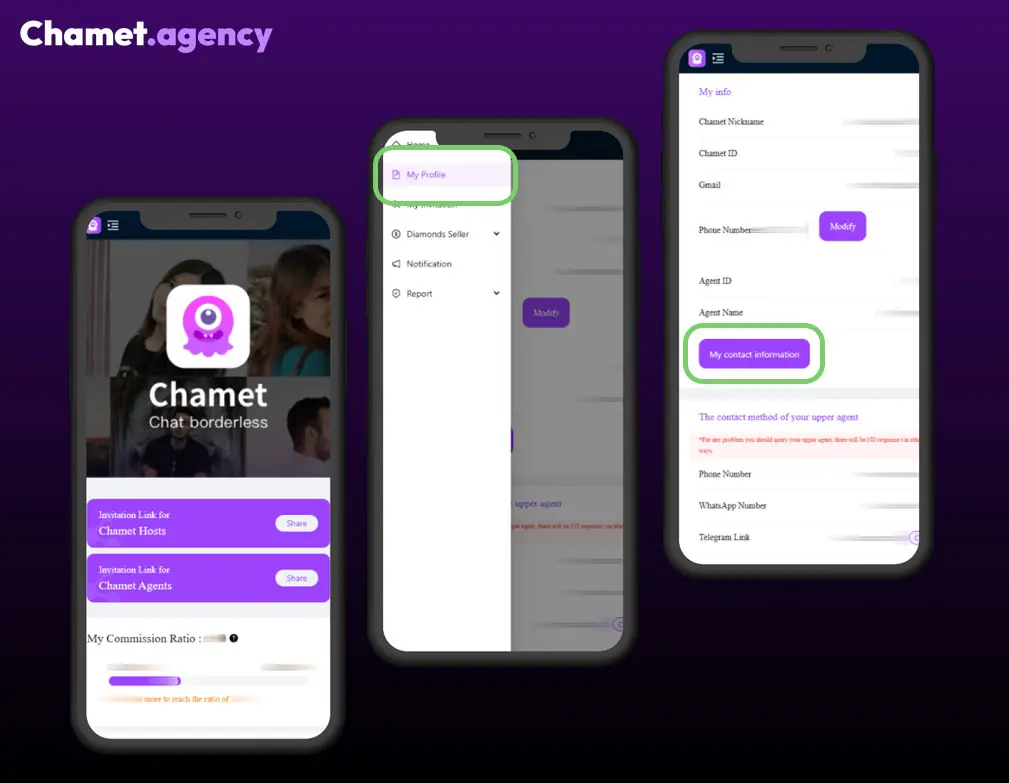
The “My Profile” Section in the Chamet Agency Dashboard
The My Profile section is where agents manage their personal account information and configure the financial settings required for commission payouts.
This area of the Chamet agency dashboard allows agents to review their account details, connect their payment method, and maintain secure access to their agency management system.
Keeping your profile information accurate helps ensure smooth communication with your team and proper processing of commission payments.
The My Info area displays the main identification details of your agent account.
- This section shows the contact information of your upper agent (the agency that invited or manages your account).
- The MetWallet Account section is responsible for managing your commission payouts.
For best results, agents should review their profile settings after completing registration and whenever changes to contact or payment details are needed.
The “My Invitations” Section
The My Invitations section is where agents manage their recruitment network. This page allows agents to track the users they have invited through their agency invitation links.
Each invitation link connects the new user directly to the agent’s agency structure during registration. Once registered through the link, the user becomes permanently associated with the inviting agent.
Agents can also review invitation history and confirm whether invited users successfully joined the agency system.
- For Hostesses go to My Invitation > Invitee List > Hosts List.
- For Subagents go to My Invitation > Invitee List > Agents List.

Agreed List vs Invitation Record List
Within the Hosts List, agents can review Invitation Record List.
This list contains all invitations sent by the agent. It shows whether a Hostess has Agreed the invitation or Rejected the invitation.

Tracking Daily Reports
The Chamet agency dashboard includes reporting tools that allow agents to track their team’s performance.
Two important reports are available:
Agents Report
This report displays earnings generated by sub-agents within your agency network. It helps agents understand how their secondary recruitment structure contributes to overall revenue.
Hosts Report
The hosts report shows earnings generated by hostesses directly connected to the agency. Agents use this report to monitor host activity and identify their top performers.
Monitoring these reports regularly helps agents understand which areas of their team generate the most revenue.

Start Your Chamet Agency Today
By completing the registration steps and learning how to use the Chamet agent dashboard, you can begin building your agency network. The guides on this website explain how to manage invitations, track reports, understand commission ratios, and scale your Chamet agency successfully.
Chamet Agency Guides
Agency registration Guide
The registration process is designed for professionals who are ready to master the platform’s rules and take full control of their recruitment strategies.
Commission System Guide
Your earnings are determined by a transparent, tiered commission system based on your network’s total performance over a rolling 30-day period. This includes the combined revenue from both your direct hostesses and your sub-agents.
Recruitment Guide
We provide the guidelines and standards necessary to recruit high-quality hostesses who excel in professional live streaming. By focusing on talent that meets Chamet’s visual and behavioral standards, you ensure long-term stability and higher retention for your agency.
Payout Cashout Guide
The settlement process is fully integrated into your agency backend, allowing you to track every dollar generated by your network. This automated approach eliminates manual billing hurdles, letting you focus entirely on growing your business.
FAQ for Chamet Agency
Below is the essential FAQ for managing a Chamet Agency, covering registration, commissions, team management, and withdrawals.
How do I become a Chamet Agent?
You must register at Chamet Agency Registration form After successful registration, you can manage your team via https://chametlogin.com
What if I don’t receive my OTP/SMS code during registration?
This is usually due to local network issues. Try again later or cjeck if you choosed the right country code or the right phone number.
How is my commission ratio calculated?
Your daily ratio is determined by the total earnings of your hostesses and sub-agents over the last 30 days. New Agents (<30 days): Calculated from your registration day to yesterday.
Can I add existing Chamet users to my agency?
No. Only users who register through your link can be added. Existing users cannot be manually added.
Are there rules against “poaching”?
Yes. You cannot bind hostesses who already work for Chamet or entice them to switch agencies. Violations result in stopping cooperation and holding payments.
How do I withdraw my commission?
You must bind a Metwallet account in your agency backend (My Profile > MetWallet Account > Bind Wallet).
When will I receive my money?
Once your accumulated commission reaches $10, the system automatically transfers it to Metwallet daily.
How do I become a Diamond Seller?
You must be a registered Agent and meet specific commission ratio requirements (which may change periodically). Access the “Diamonds Seller” section in your dashboard to apply.