

Chamet Agency Payment
Withdrawal Guide
The Chamet agency payment system allows agents to receive commission earnings generated by their hostesses and sub-agents. These payments are processed through the official payout platform called MetWallet.
How Chamet Agency Payments Work ?
Chamet Agent receive commission everyday on Metwallet. inside Metwallet you can choose between multiple Payment methods (Paypal / Bank transfert / Usdt-Trc20 / GCash /… ). Minimum Withdrawal $10.
What is Metwallet ?
Metwallet is the official withdrawal platform used by Chamet to pay Agents and Hostesses.
DAILY Payments
$10 Minimum
Multiple Payment Methodes
Including Crypto
How to Bind Metwallet To Chamet Agency ?
Follow these steps to bind your Chamet agency to Metwallet:
Log in to the Chamet agency dashboard
Open the My Profile section
Scroll down and click “Bind” in Metwallet Section.
Create MetWallet account using phone number / email.
Confirm and save the connection
Once your MetWallet account is connected to Chamet Agency, the system can transfer your commission payments when the withdrawal conditions are met.
Step 1
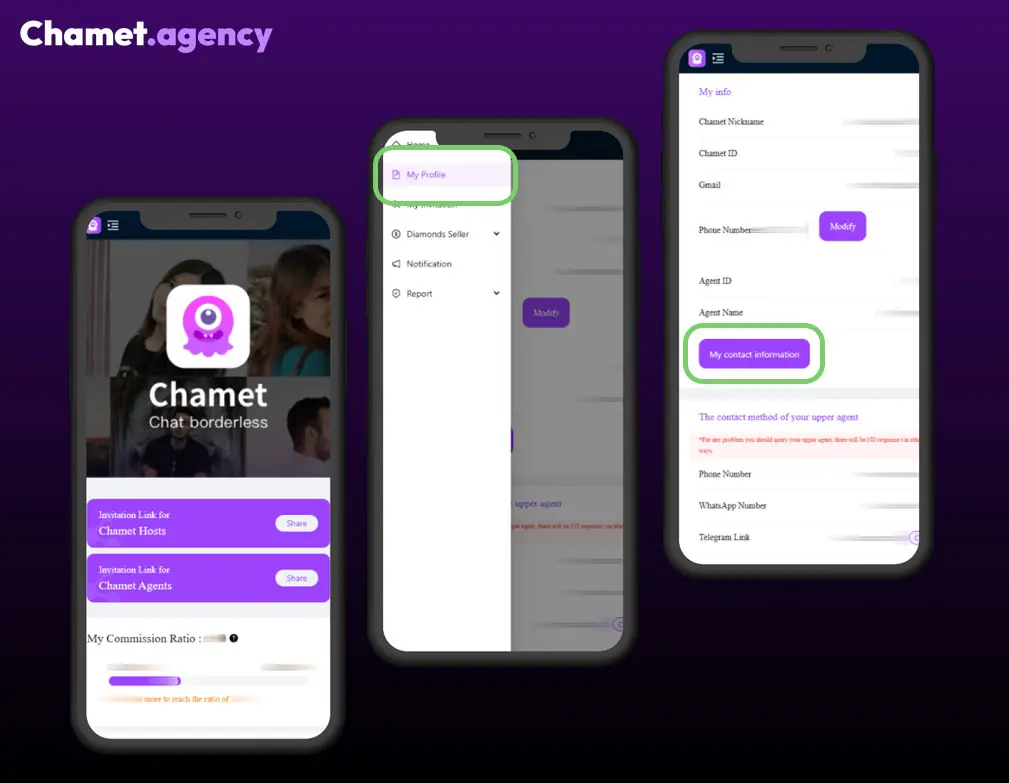
Step 2
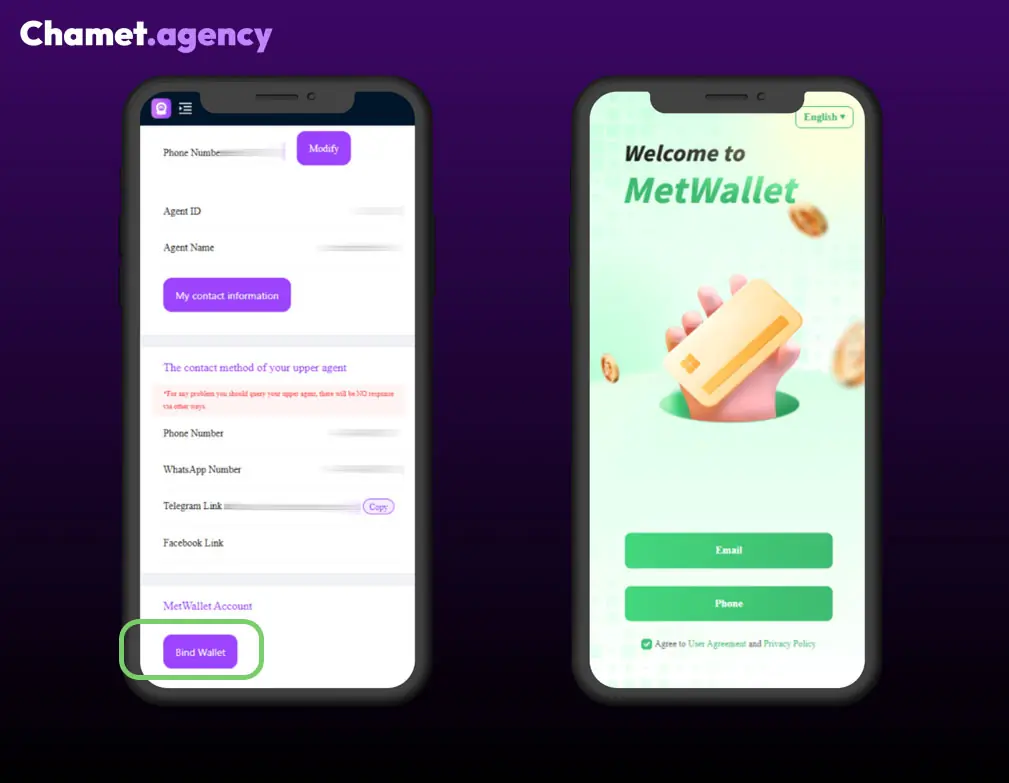
Step 3

Step 4

What are Chamet Agent Income Sources ?

Commission on Hostesses
Agents receive a percentage of the earnings generated by hostesses who registered through their invitation links. These earnings come from activities such as video calls and gifts received on the platform.
The agent’s commission ratio is applied to the total host earnings generated during the reporting period.
Commission on Sub-Agent
When sub-agents generate revenue through their own teams, the upper agent receives a portion of the earnings based on the difference between their commission ratio and the sub-agent’s ratio.
This structure allows agents to increase their earnings by building larger agency networks.
How to Track Your Agency Earnings ?
Chamet Agents can track their commission performance directly inside the Chamet agent dashboard. The dashboard provides several reports that help agents monitor their revenue.

Hostesses Report
My Invitation > Invitation Rewards > Regular Rewards
This report shows the earnings generated by hostesses connected directly to your agency.
SubAgents Report
My Invitation > Invitation Rewards > Extra Rewards
This section displays revenue generated by sub-agents and their teams.
Metwallet Minimum Payout Requirements
Chamet agents minimum Payout is $10 USD. Agents can withdraw their commission once the accumulated earnings reach the minimum payout threshold.
The payout system automatically processes commission payments to Metwallet after the threshold (Minimum $10) is reached and the payment method is properly configured.
To avoid payment delays, agents should ensure that:
MetWallet account is correctly bound
Profile information is accurate
Commission balance meets the withdrawal requirements
Why a Withdrawal May Fail ?
In some situations, agents or hostesses may experience withdrawal problems.
Common causes
MetWallet account not connected
payout threshold not reached
incorrect account information
temporary system verification delay
If a withdrawal fails, agents should first verify their Metwallet configuration and account information inside the dashboard.
Recommended practices
checking commission reports daily
keeping MetWallet information updated
monitoring team revenue activity
verifying payout thresholds before withdrawing
By managing financial settings carefully, agents can ensure smooth commission payouts and better control their agency earnings.
Start Your Chamet Agency Today
By completing the registration steps and learning how to use the Chamet agent dashboard, you can begin building your agency network. The guides on this website explain how to manage invitations, track reports, understand commission ratios, and scale your Chamet agency successfully.
Chamet Agency Guides
Chamet Agency Registration
Learn how to register, activate your agency account and start building your team.
Chamet Agency Commission
Understand commission levels, calculations and how agency revenue is generated.
Chamet Agency Dashboard
Learn how to manage hosts, sub-agents, reports and agency performance.
Chamet Agency Recruitment
Learn how to recruit and manage hosts and grow your agency network.
FAQ for Chamet Agency
Below is the essential FAQ for managing a Chamet Agency, covering registration, commissions, team management, and withdrawals.
How do I become a Chamet Agent?
You must register at Chamet Agency Registration form After successful registration, you can manage your team via https://chametlogin.com
What if I don’t receive my OTP/SMS code during registration?
This is usually due to local network issues. Try again later or cjeck if you choosed the right country code or the right phone number.
How is my commission ratio calculated?
Your daily ratio is determined by the total earnings of your hostesses and sub-agents over the last 30 days. New Agents (<30 days): Calculated from your registration day to yesterday.
Can I add existing Chamet users to my agency?
No. Only users who register through your link can be added. Existing users cannot be manually added.
Are there rules against “poaching”?
Yes. You cannot bind hostesses who already work for Chamet or entice them to switch agencies. Violations result in stopping cooperation and holding payments.
How do I withdraw my commission?
You must bind a Metwallet account in your agency backend (My Profile > MetWallet Account > Bind Wallet).
When will I receive my money?
Once your accumulated commission reaches $10, the system automatically transfers it to Metwallet daily.
How do I become a Diamond Seller?
You must be a registered Agent and meet specific commission ratio requirements (which may change periodically). Access the “Diamonds Seller” section in your dashboard to apply.